클릭하여 전체 이미지 보기 · 원본 사례 참조용
사례 출처
@wolfaidev ↗ · 사례 #91
원본 사례 내용을 유지합니다. 생성 결과는 모델 버전, 참조 이미지 및 매개변수에 따라 달라질 수 있으며, 본 사이트에서 개별 검증을 진행하지 않아 동일한 결과의 재현을 보장하지 않습니다.
UI 및 인터페이스 / PROMPT #91
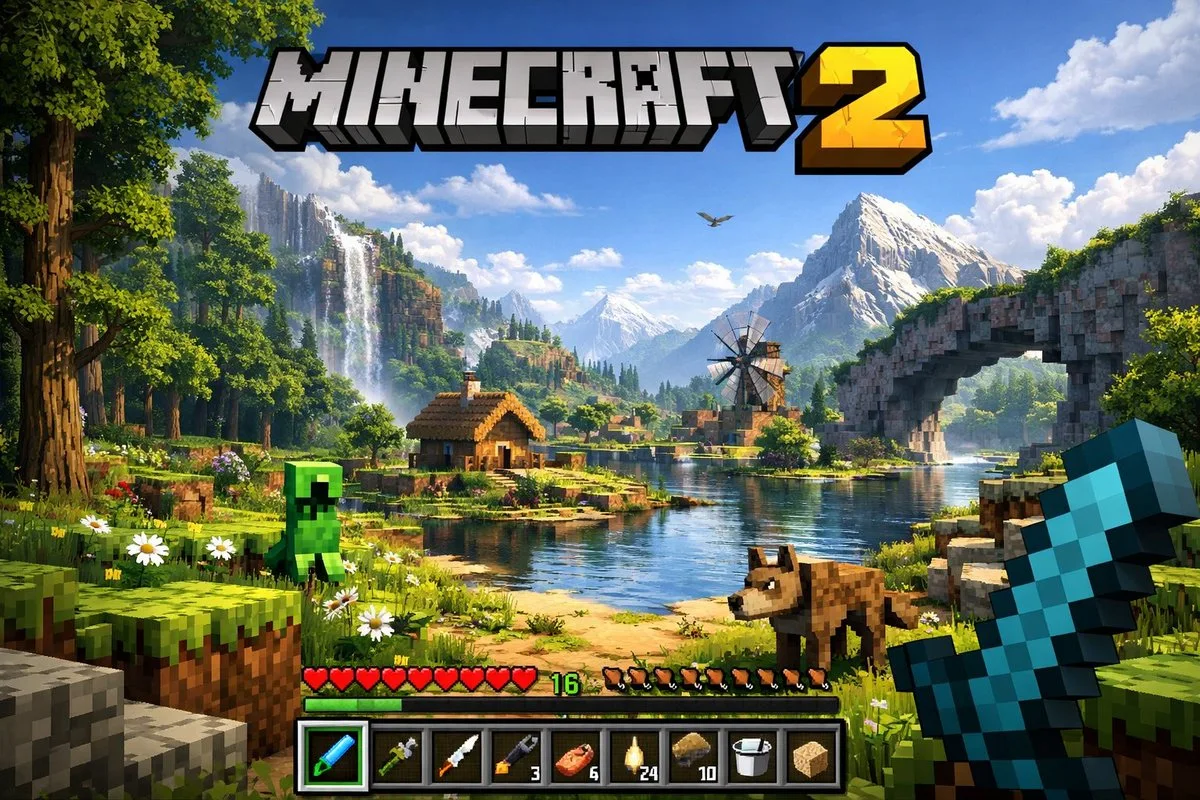
게임 UI 스크린샷
먼저 이미지를 확인한 뒤 원본 프롬프트를 복사하세요. 치환 문구가 있는 경우 아래에서 원하는 내용으로 변경할 수 있습니다.
01 / 나만의 버전 설정
이 사례에는 명시적인 치환 문구가 없습니다. 복사 후 피사체, 색상, 텍스트, 비율을 직접 수정해 보세요.
02 / 전체 프롬프트 · 원문
A highly detailed, realistic first-person video game screenshot of a next-generation voxel-based world. At the top center, a large, bold 3D logo reads "{argument name="game title" default="MINECRAFT 2"}". The scene features a {argument name="environment" default="lush, blocky landscape with a river, a small wooden cabin, a windmill, a waterfall, and majestic mountains in the background"}. The world blends realistic lighting, volumetric clouds, and high-resolution textures with cubic, voxel geometry. In the foreground on the left, a {argument name="mob 1" default="blocky green creeper"} stands on the grass, while a {argument name="mob 2" default="blocky brown wolf"} stands on the dirt path to the right. On the far right, the player's hand holds a {argument name="held item" default="pixelated blue diamond sword"} in a first-person perspective. At the bottom of the screen is a game user interface featuring a health bar with 10 red hearts, a green experience bar with the number '16', a hunger bar with 10 brown meat icons, and a 9-slot inventory hotbar. The hotbar contains, from left to right: a selected blue tool with a green highlight box, a green tool, a knife, a wrench with the number '3', a piece of meat with '6', a lantern with '24', a dirt block with '10', a bucket, and a sponge block.사용하시는 이미지 생성 도구에 붙여넣어 사용하세요. 본 사이트는 프롬프트 탐색 및 편집 기능만 제공하며 직접 이미지를 생성하지 않습니다.
03 / 생성 전 체크리스트
- 치환 문구를 구체적인 내용으로 바꾸고, 참조 이미지가 필요한지 확인하세요.
- 텍스트가 포함된 경우 원하는 문구를 명확히 지정하고, 생성 후 글자를 꼼꼼히 확인하세요.
- 효과를 쉽게 비교할 수 있도록 피사체, 조명, 구도 중 한 번에 하나씩만 수정하세요.
관련 영감 더 둘러보기
더 많은 UI 및 인터페이스 사례