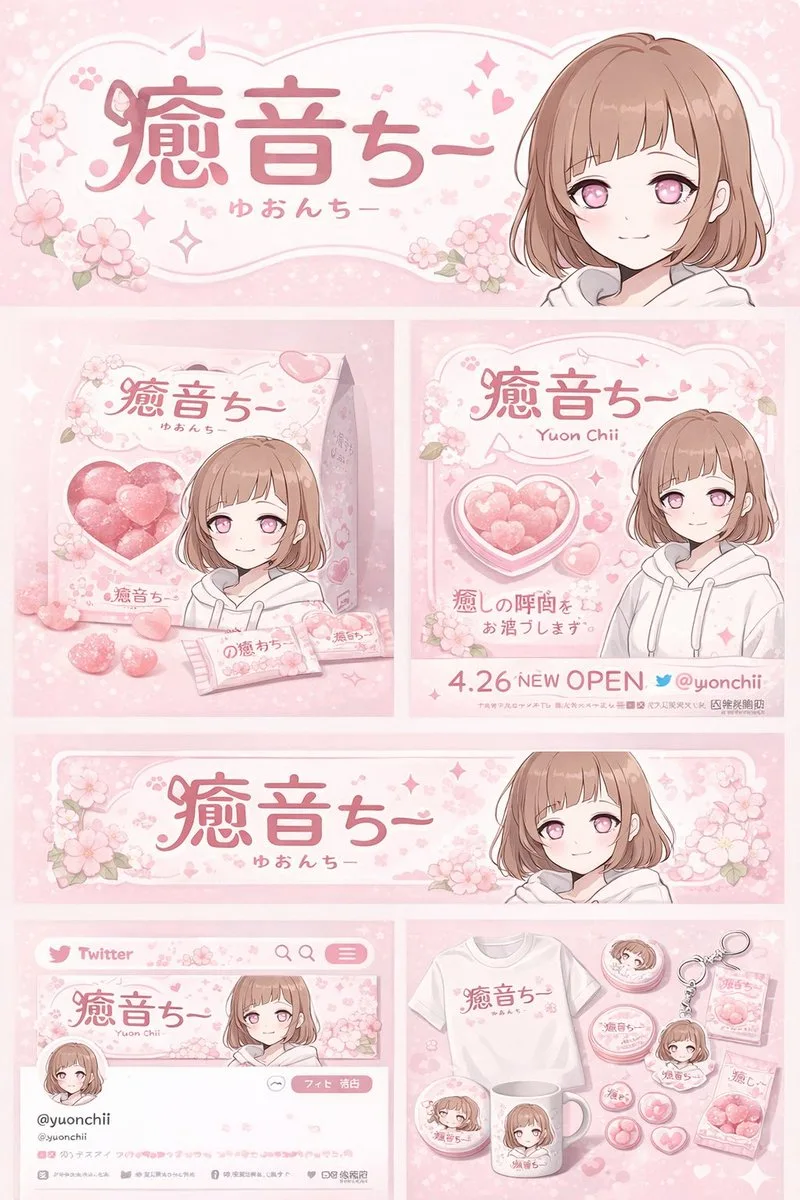
클릭하여 전체 이미지 보기 · 원본 사례 참조용
사례 출처
@chi_vc_ ↗ · 사례 #130
원본 사례 내용을 유지합니다. 생성 결과는 모델 버전, 참조 이미지 및 매개변수에 따라 달라질 수 있으며, 본 사이트에서 개별 검증을 진행하지 않아 동일한 결과의 재현을 보장하지 않습니다.
브랜드 및 로고 / PROMPT #130
UI 인터랙션 디자인 · #130
먼저 이미지를 확인한 뒤 원본 프롬프트를 복사하세요. 치환 문구가 있는 경우 아래에서 원하는 내용으로 변경할 수 있습니다.
01 / 나만의 버전 설정
02 / 전체 프롬프트 · 원문
{
  "type": "brand identity and merchandise design board",
  "theme": {
    "color_palette": "{argument name=\"theme color\" default=\"pastel pink\"} and white",
    "motif": "{argument name=\"motif\" default=\"cherry blossoms\"} and pink hearts"
  },
  "character": {
    "description": "anime girl with short brown bob hair, pink eyes, wearing a white hoodie, gentle smile"
  },
  "branding": {
    "main_logo": "{argument name=\"character name\" default=\"癒音ちー\"}",
    "sub_logo": "{argument name=\"character subtext\" default=\"ゆおんちー\"}"
  },
  "layout": {
    "sections": [
      {
        "type": "header banner",
        "position": "top",
        "elements": ["large main logo", "sub logo", "cherry blossom graphics", "character portrait on the right"]
      },
      {
        "type": "product packaging",
        "position": "middle left",
        "elements": ["1 square box with heart-shaped transparent window showing pink heart candies", "character illustration on box", "2 individual candy wrappers", "5 scattered heart candies"]
      },
      {
        "type": "promotional poster",
        "position": "middle right",
        "elements": ["character portrait", "heart-shaped candy bowl", "main logo", "text '4.26 NEW OPEN'", "text '{argument name=\"social handle\" default=\"@yuonchii\"}'"]
      },
      {
        "type": "horizontal web banner",
        "position": "lower middle",
        "elements": ["main logo", "cherry blossoms", "character portrait on the right"]
      },
      {
        "type": "social media profile mockup",
        "position": "bottom left",
        "elements": ["header image with logo", "1 circular profile picture", "handle '{argument name=\"social handle\" default=\"@yuonchii\"}'", "1 follow button", "mock bio text"]
      },
      {
        "type": "merchandise collection",
        "position": "bottom right",
        "count": 9,
        "items": ["1 white t-shirt with logo", "1 white mug with character", "4 round pin badges", "1 acrylic keychain", "2 candy packets"]
      }
    ]
  }
}사용하시는 이미지 생성 도구에 붙여넣어 사용하세요. 본 사이트는 프롬프트 탐색 및 편집 기능만 제공하며 직접 이미지를 생성하지 않습니다.
03 / 생성 전 체크리스트
- 치환 문구를 구체적인 내용으로 바꾸고, 참조 이미지가 필요한지 확인하세요.
- 텍스트가 포함된 경우 원하는 문구를 명확히 지정하고, 생성 후 글자를 꼼꼼히 확인하세요.
- 효과를 쉽게 비교할 수 있도록 피사체, 조명, 구도 중 한 번에 하나씩만 수정하세요.
관련 영감 더 둘러보기
더 많은 브랜드 및 로고 사례