클릭하여 전체 이미지 보기 · 원본 사례 참조용
사례 출처
@HumanOS_v2 ↗ · 사례 #82
원본 사례 내용을 유지합니다. 생성 결과는 모델 버전, 참조 이미지 및 매개변수에 따라 달라질 수 있으며, 본 사이트에서 개별 검증을 진행하지 않아 동일한 결과의 재현을 보장하지 않습니다.
UI 및 인터페이스 / PROMPT #82
인포그래픽 시각화 디자인 · #82
먼저 이미지를 확인한 뒤 원본 프롬프트를 복사하세요. 치환 문구가 있는 경우 아래에서 원하는 내용으로 변경할 수 있습니다.
01 / 나만의 버전 설정
이 사례에는 명시적인 치환 문구가 없습니다. 복사 후 피사체, 색상, 텍스트, 비율을 직접 수정해 보세요.
02 / 전체 프롬프트 · 원문
{
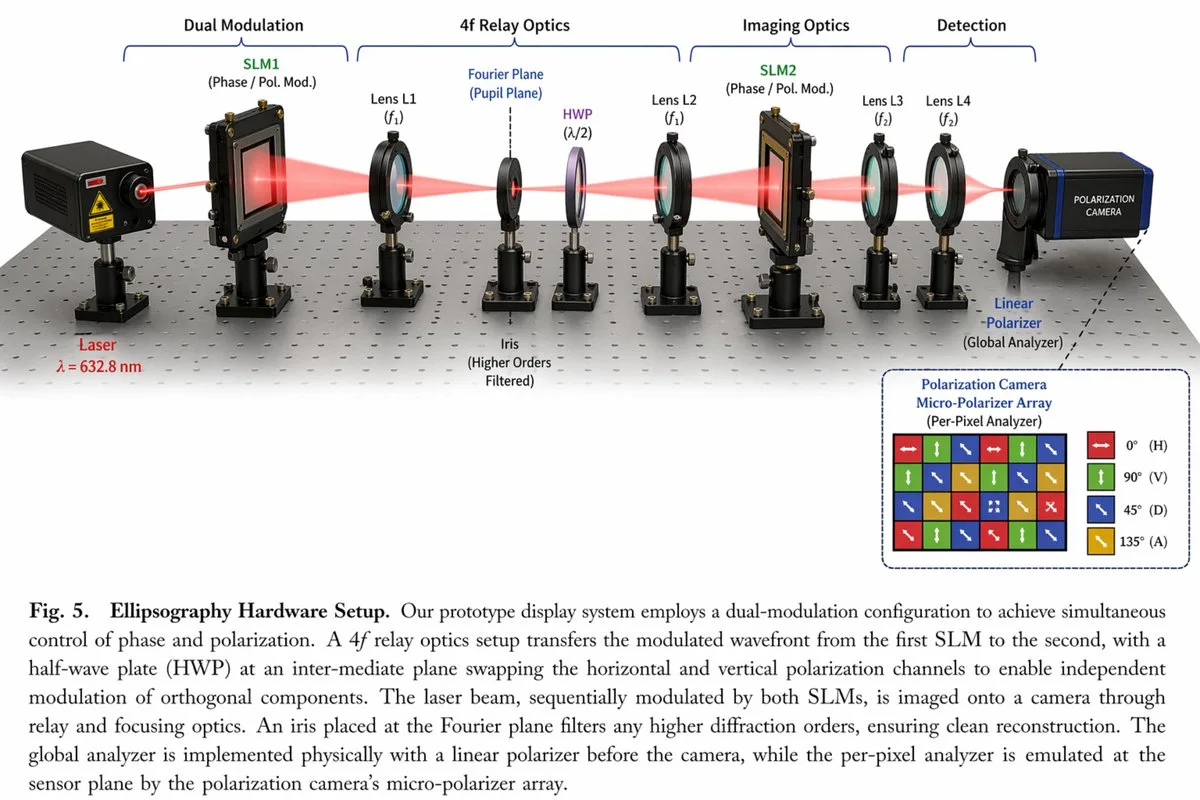
  "type": "scientific optical setup diagram",
  "main_setup": {
    "base": "optical breadboard table with grid of mounting holes",
    "beam": "red laser beam passing horizontally through all components",
    "top_grouping_brackets": [
      "{argument name=\"first component group\" default=\"Dual Modulation\"}",
      "4f Relay Optics",
      "Imaging Optics",
      "Detection"
    ],
    "components_left_to_right": [
      { "name": "Laser", "label": "{argument name=\"laser wavelength\" default=\"λ = 632.8 nm\"}", "appearance": "black rectangular box" },
      { "name": "SLM1", "label": "(Phase / Pol. Mod.)", "appearance": "black square device on post" },
      { "name": "Lens L1", "label": "(f1)", "appearance": "lens in black ring mount" },
      { "name": "Iris", "label": "Fourier Plane (Pupil Plane) / (Higher Orders Filtered)", "appearance": "black ring mount with dashed line above" },
      { "name": "HWP", "label": "(λ/2)", "appearance": "purple-tinted optic in black ring mount" },
      { "name": "Lens L2", "label": "(f1)", "appearance": "lens in black ring mount" },
      { "name": "SLM2", "label": "(Phase / Pol. Mod.)", "appearance": "black square device on post" },
      { "name": "Lens L3", "label": "(f2)", "appearance": "lens in black ring mount" },
      { "name": "Lens L4", "label": "(f2)", "appearance": "lens in black ring mount" },
      { "name": "Linear Polarizer", "label": "(Global Analyzer)", "appearance": "lens in black ring mount" },
      { "name": "Polarization Camera", "label": "POLARIZATION CAMERA", "appearance": "blue and black box camera" }
    ]
  },
  "inset_diagram": {
    "position": "bottom right, dashed border",
    "title": "{argument name=\"inset title\" default=\"Polarization Camera Micro-Polarizer Array\"} (Per-Pixel Analyzer)",
    "visuals": "4x4 grid of colored squares with white directional arrows",
    "legend_count": 4,
    "legend_labels": [
      "red right-arrow 0° (H)",
      "green up-arrow 90° (V)",
      "blue diagonal-arrow 45° (D)",
      "yellow diagonal-arrow 135° (A)"
    ]
  },
  "bottom_caption": {
    "figure_number": "Fig. 5.",
    "title": "{argument name=\"setup title\" default=\"Ellipsography Hardware Setup.\"}",
    "description": "{argument name=\"figure caption\" default=\"Our prototype display system employs a dual-modulation configuration to achieve simultaneous control of phase and polarization. A 4f relay optics setup transfers the modulated wavefront...\"}"
  }
}사용하시는 이미지 생성 도구에 붙여넣어 사용하세요. 본 사이트는 프롬프트 탐색 및 편집 기능만 제공하며 직접 이미지를 생성하지 않습니다.
03 / 생성 전 체크리스트
- 치환 문구를 구체적인 내용으로 바꾸고, 참조 이미지가 필요한지 확인하세요.
- 텍스트가 포함된 경우 원하는 문구를 명확히 지정하고, 생성 후 글자를 꼼꼼히 확인하세요.
- 효과를 쉽게 비교할 수 있도록 피사체, 조명, 구도 중 한 번에 하나씩만 수정하세요.
관련 영감 더 둘러보기
더 많은 UI 및 인터페이스 사례