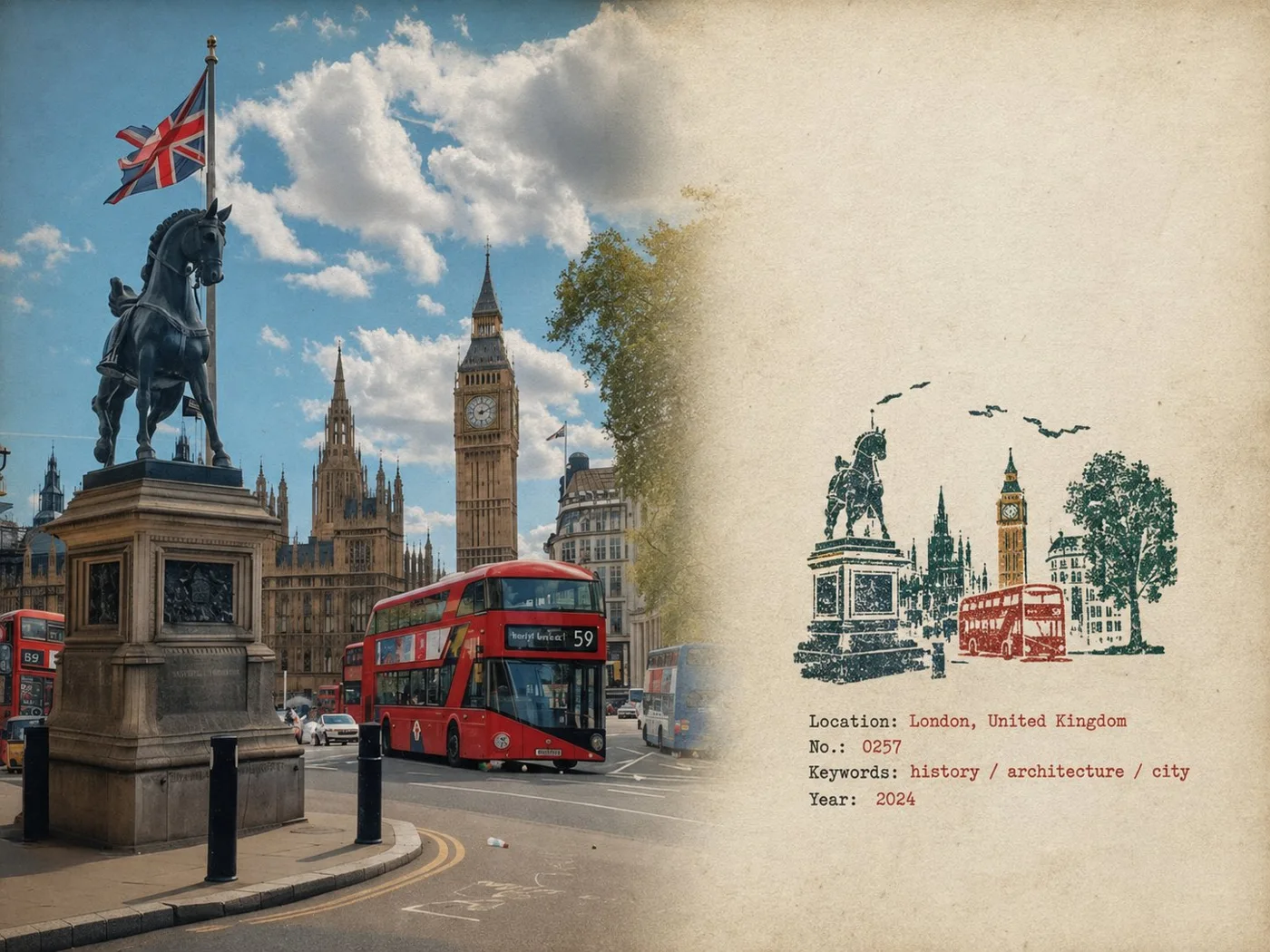
클릭하여 전체 이미지 보기 · 원본 사례 참조용
사례 출처
@MahnoorAi12 ↗ · 사례 #538
원본 사례 내용을 유지합니다. 생성 결과는 모델 버전, 참조 이미지 및 매개변수에 따라 달라질 수 있으며, 본 사이트에서 개별 검증을 진행하지 않아 동일한 결과의 재현을 보장하지 않습니다.
포스터 및 타이포그래피 / PROMPT #538
고무도장 여행 필드노트 포스터
먼저 이미지를 확인한 뒤 원본 프롬프트를 복사하세요. 치환 문구가 있는 경우 아래에서 원하는 내용으로 변경할 수 있습니다.
01 / 나만의 버전 설정
이 사례에는 명시적인 치환 문구가 없습니다. 복사 후 피사체, 색상, 텍스트, 비율을 직접 수정해 보세요.
02 / 전체 프롬프트 · 원문
Rubber Stamp Travel Field Notes Poster — Natural Realism Version

Create a separate “Rubber Stamp Travel Field Notes Poster” for each photo I upload. Output each photo individually. Never create a collage or combine multiple photos.

Use a 4:3 landscape composition with a natural visual transition between the original photograph on the left and the aged-paper field-note area on the right. Do not add an obvious dividing line.

LEFT — ORIGINAL PHOTOGRAPH

The left side should occupy roughly 58% of the frame.

Keep the uploaded photograph visually authentic and recognizable. Preserve the original subject, perspective, terrain, architecture, plants, people, spatial relationships, natural light, shadows, textures, and overall atmosphere.

Do not redesign or reinterpret the photograph.

Only apply a very subtle editorial photo treatment: gentle tonal balancing, restrained color grading, slightly softened highlights, and extremely fine natural film grain. It should still look like a real photograph taken on location rather than an AI-generated image.

Natural cropping is allowed if needed to fit the 4:3 layout, but do not stretch, distort, move, replace, or redraw the main subject.

Avoid excessive sharpness, HDR effects, artificial clarity, cinematic color grading, or overly perfect details.

RIGHT — AGED PAPER FIELD NOTES

The right side should occupy roughly 42% of the frame.

Use warm off-white, slightly aged paper with a believable physical texture. Include very subtle paper fibers, fine grain, faint handling marks, and a matte surface.

Keep large areas completely unprinted.

The paper should feel like a real sheet from an architect's travel notebook or field journal, not a designed poster background.

Avoid overly strong stains, decorative textures, vintage filters, or artificial grunge.

SMALL RUBBER STAMP

Study the uploaded photograph and identify only the few visual features that make the location immediately recognizable.

Reduce them into a compact, imperfect multi-color rubber stamp impression.

Do not reproduce the photograph element by element.

Simplify aggressively and retain only the most meaningful visual relationships:

- distinctive architecture and silhouette
- important roof, tower, dome, arch, or structural shape
- mountain or terrain contours
- shoreline or road direction
- a few recognizable trees or vegetation forms
- simplified settlement layers
- one or two important foreground shapes when visually relevant

Remove crowds, cars, dense windows, repetitive buildings, tiny vegetation, decorative objects, and insignificant background details.

The result should look like something a traveler could have actually carved into a small rubber stamp, not a miniature illustration of the entire photograph.

Place the stamp in the lower-middle portion of the right paper area, occupying approximately 30–38% of the right section's height.

Keep generous blank paper around it.

Do not enlarge it into a large illustration.

STAMP COLOR & PRINT CHARACTER

Extract approximately 2–4 muted spot colors naturally from the original photograph.

Possible colors include:

- carbon black
- deep green
- brick or muted red
- ochre
- slate blue
- taupe or earthy brown

Do not force these colors if the photograph suggests a different restrained palette.

Each color should appear as a separate physical ink layer.

Make the print feel genuinely handmade:

- slightly uneven pressure
- tiny gaps in the ink
- dry areas
- paper showing through
- rough carved edges
- irregular line thickness
- small contour breaks
- granular ink texture
- faint ghosting
- slight natural color-layer misregistration
- subtle edge variation

The imperfections should be small and believable, as if the stamp was pressed onto paper by hand.

Avoid perfectly aligned digital layers, smooth vector edges, clean gradients, or artificially exaggerated distress.

The stamp should look physically printed, not digitally illustrated.

FIELD-NOTE TYPOGRAPHY

Generate a small amount of text based only on the actual location and imagery in the photograph:

Location — English name
No. — Number
Three short English keywords
Gregorian calendar year

Place the text below or beside the stamp within the available whitespace.

Use a small, understated typewriter or archival field-note style.

The typography should have very slight mechanical irregularity, as though typed or printed on an old field notebook.

Keep it quiet and secondary to the photograph.

Spell the location and all words correctly.

Do not add slogans, brands, tourist phrases, decorative quotes, or unnecessary text.

OVERALL REALISM

The finished image should feel like a real travel photograph mounted beside a small handmade field stamp on an architect's personal notebook page.

Prioritize subtle physical realism over visual perfection.

The photograph should remain the strongest visual element.

The stamp should feel like a small fragment of memory extracted from the photograph rather than a second illustration.

Use restrained contrast, natural imperfections, believable paper texture, and slightly imperfect printing.

The final result should feel quiet, tactile, documentary, collectible, and genuinely handmade.

Avoid

Obvious dividing lines, circular seals, postage-stamp borders, perforations, wax seals, sticker layouts, souvenir-card designs, generic travel templates, smooth vector logos, polished digital illustrations, cartoon styling, 3D rendering, plastic textures, glossy gradients, excessive saturation, HDR effects, excessive text, decorative clutter, overly clean geometry, perfectly aligned ink layers, dense miniature architecture, or any alteration/redrawing of the original photograph.
사용하시는 이미지 생성 도구에 붙여넣어 사용하세요. 본 사이트는 프롬프트 탐색 및 편집 기능만 제공하며 직접 이미지를 생성하지 않습니다.
03 / 생성 전 체크리스트
- 치환 문구를 구체적인 내용으로 바꾸고, 참조 이미지가 필요한지 확인하세요.
- 텍스트가 포함된 경우 원하는 문구를 명확히 지정하고, 생성 후 글자를 꼼꼼히 확인하세요.
- 효과를 쉽게 비교할 수 있도록 피사체, 조명, 구도 중 한 번에 하나씩만 수정하세요.
관련 영감 더 둘러보기
더 많은 포스터 및 타이포그래피 사례