클릭하여 전체 이미지 보기 · 원본 사례 참조용
사례 출처
@Strength04_X ↗ · 사례 #441
원본 사례 내용을 유지합니다. 생성 결과는 모델 버전, 참조 이미지 및 매개변수에 따라 달라질 수 있으며, 본 사이트에서 개별 검증을 진행하지 않아 동일한 결과의 재현을 보장하지 않습니다.
이커머스 제품 / PROMPT #441
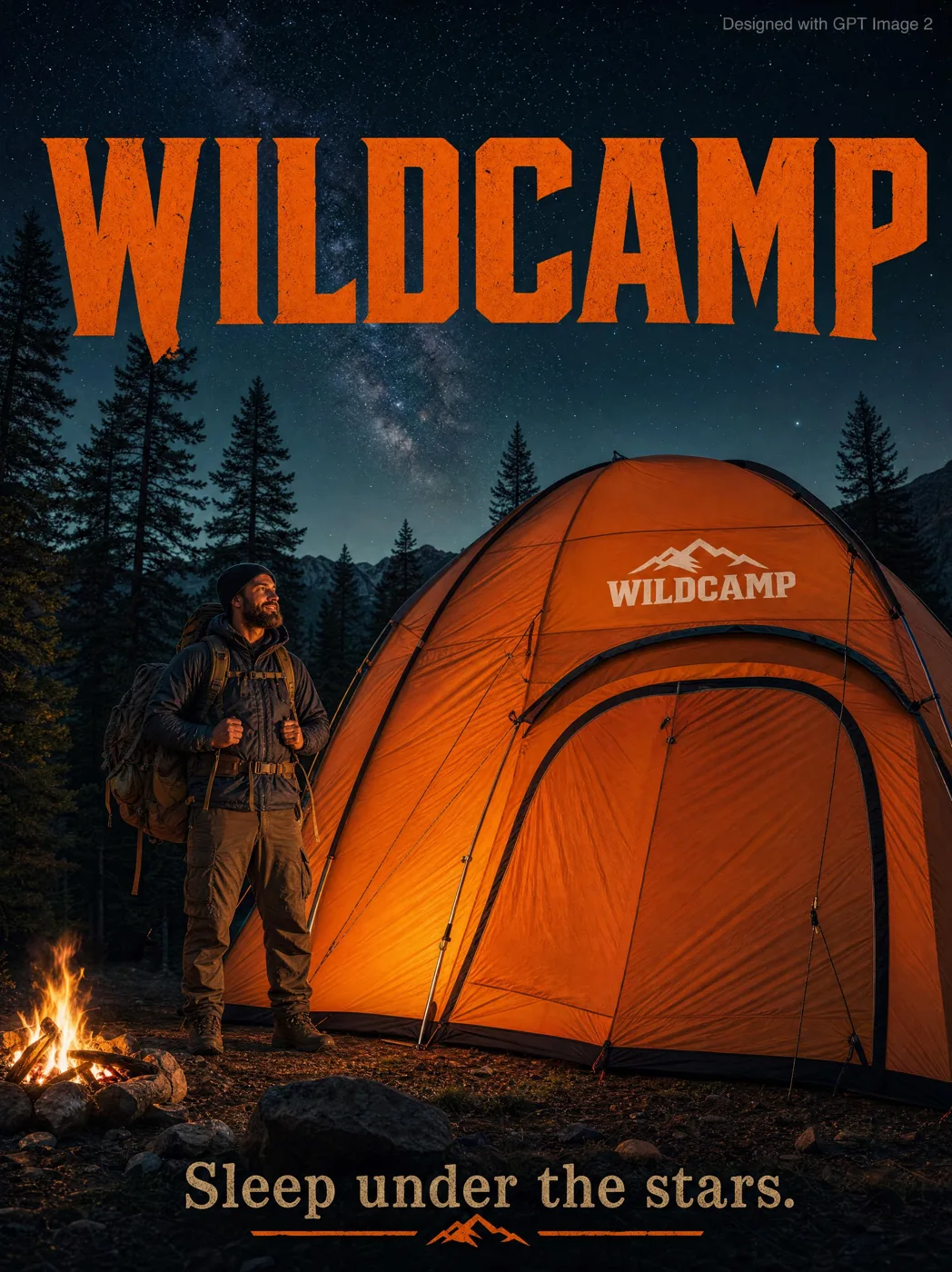
WILDCAMP 대형 텐트 광고 포스터
먼저 이미지를 확인한 뒤 원본 프롬프트를 복사하세요. 치환 문구가 있는 경우 아래에서 원하는 내용으로 변경할 수 있습니다.
01 / 나만의 버전 설정
이 사례에는 명시적인 치환 문구가 없습니다. 복사 후 피사체, 색상, 텍스트, 비율을 직접 수정해 보세요.
02 / 전체 프롬프트 · 원문
An outdoor adventure advertisement poster featuring a rugged bearded man in full hiking gear standing confidently beside a massive orange camping tent three times taller than him, fully pitched in a dramatic forest clearing surrounded by towering pine trees beneath a deep starry night sky. The tent features a bold white “WILDCAMP” logo stitched onto the rainfly. Warm cinematic campfire lighting illuminates the scene with realistic shadows and rich outdoor textures, creating a premium adventure-commercial aesthetic. Large rugged serif typography reading “WILDCAMP” dominates the dark sky area in bold orange lettering, while the tagline “Sleep under the stars.” appears elegantly at the bottom. Small grey text in the top-right corner reads “Designed with GPT Image 2.” Photorealistic, ultra-detailed, cinematic outdoor advertising style with dramatic atmosphere and high-end commercial composition.
사용하시는 이미지 생성 도구에 붙여넣어 사용하세요. 본 사이트는 프롬프트 탐색 및 편집 기능만 제공하며 직접 이미지를 생성하지 않습니다.
03 / 생성 전 체크리스트
- 치환 문구를 구체적인 내용으로 바꾸고, 참조 이미지가 필요한지 확인하세요.
- 텍스트가 포함된 경우 원하는 문구를 명확히 지정하고, 생성 후 글자를 꼼꼼히 확인하세요.
- 효과를 쉽게 비교할 수 있도록 피사체, 조명, 구도 중 한 번에 하나씩만 수정하세요.
관련 영감 더 둘러보기
더 많은 이커머스 제품 사례