클릭하여 전체 이미지 보기 · 원본 사례 참조용
사례 출처
@takadtmnu ↗ · 사례 #141
원본 사례 내용을 유지합니다. 생성 결과는 모델 버전, 참조 이미지 및 매개변수에 따라 달라질 수 있으며, 본 사이트에서 개별 검증을 진행하지 않아 동일한 결과의 재현을 보장하지 않습니다.
이커머스 제품 / PROMPT #141
이커머스 상품 전시 디자인 · #141
먼저 이미지를 확인한 뒤 원본 프롬프트를 복사하세요. 치환 문구가 있는 경우 아래에서 원하는 내용으로 변경할 수 있습니다.
01 / 나만의 버전 설정
02 / 전체 프롬프트 · 원문
{
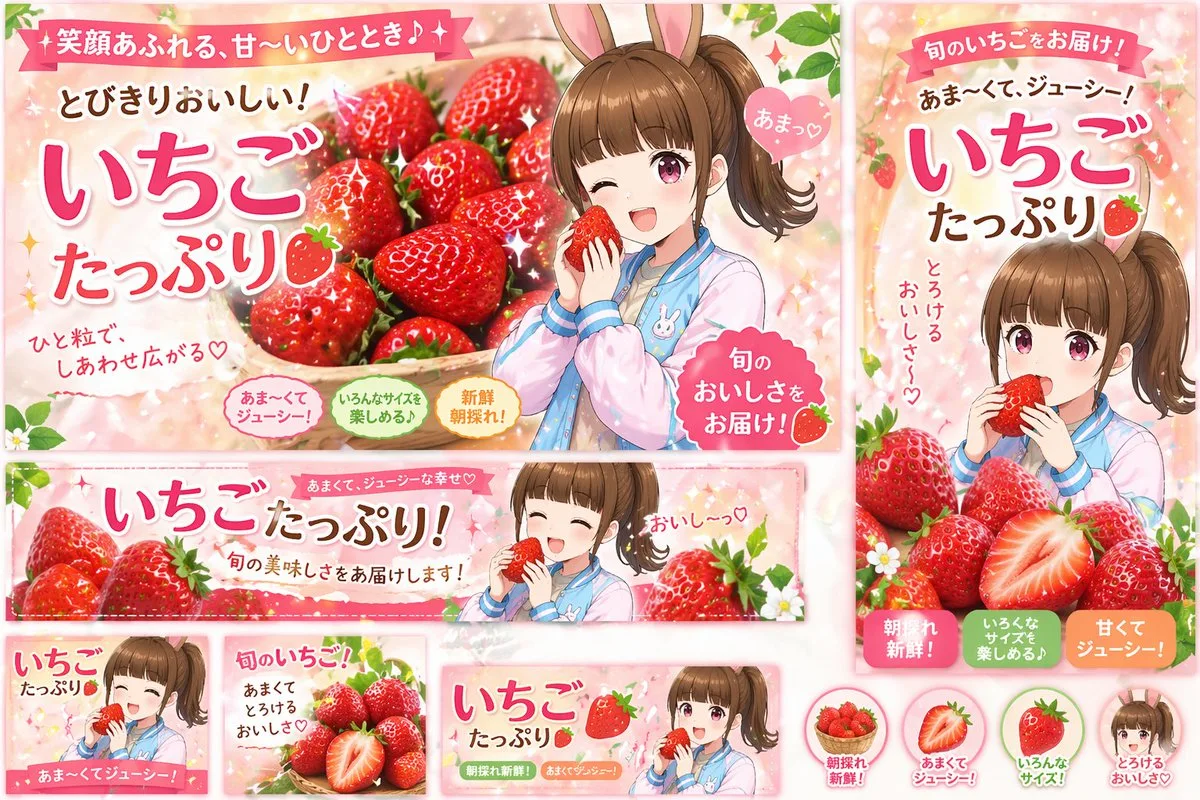
  "type": "promotional banner design set",
  "theme": "strawberry advertisement campaign",
  "style": "anime illustration, bright, cheerful, commercial graphic design",
  "color_palette": "{argument name=\"primary color theme\" default=\"pastel pink and vibrant red\"}",
  "character": "{argument name=\"character description\" default=\"anime girl with brown side ponytail and bunny ears, wearing a pastel blue and pink jacket\"}",
  "product": "{argument name=\"product\" default=\"fresh red strawberries\"}",
  "layout": {
    "sections": [
      {
        "type": "large landscape banner",
        "position": "top left",
        "visuals": "character winking and holding a strawberry next to a large basket of strawberries",
        "main_text": "{argument name=\"main headline\" default=\"いちごたっぷり\"}",
        "sub_text": ["笑顔あふれる、甘〜いひととき♪", "とびきりおいしい!", "ひと粒で、しあわせ広がる♡", "あまっ♡", "旬のおいしさをお届け!"],
        "badges": {
          "count": 3,
          "labels": ["あま〜くてジューシー!", "いろんなサイズを楽しめる♪", "新鮮朝採れ!"]
        }
      },
      {
        "type": "vertical banner",
        "position": "right",
        "visuals": "character eating a strawberry with a pile of strawberries below",
        "main_text": "いちごたっぷり",
        "sub_text": ["旬のいちごをお届け!", "{argument name=\"secondary headline\" default=\"あま〜くて、ジューシー!\"}", "とろけるおいしさ〜♡"],
        "badges": {
          "count": 3,
          "labels": ["朝採れ新鮮!", "いろんなサイズを楽しめる♪", "甘くてジューシー!"]
        }
      },
      {
        "type": "wide horizontal banner",
        "position": "middle",
        "visuals": "character with closed eyes eating a strawberry, flanked by strawberries",
        "main_text": "いちごたっぷり!",
        "sub_text": ["あまくて、ジューシーな幸せ♡", "旬の美味しさをお届けします!", "おいし〜っ♡"]
      },
      {
        "type": "small square banner",
        "position": "bottom left",
        "visuals": "character smiling holding strawberry",
        "text": ["いちごたっぷり", "あま〜くてジューシー!"]
      },
      {
        "type": "small square banner",
        "position": "bottom mid-left",
        "visuals": "pile of strawberries with one cut in half",
        "text": ["旬のいちご!", "あまくてとろけるおいしさ♡"]
      },
      {
        "type": "small horizontal banner",
        "position": "bottom mid-right",
        "visuals": "character holding strawberry",
        "text": ["いちごたっぷり", "朝採れ新鮮!", "あまくてジューシー!"]
      },
      {
        "type": "circular icons",
        "position": "bottom right",
        "count": 4,
        "items": [
          { "visual": "basket of strawberries", "label": "朝採れ新鮮!" },
          { "visual": "half strawberry", "label": "あまくてジューシー!" },
          { "visual": "whole strawberry", "label": "いろんなサイズ!" },
          { "visual": "character face", "label": "とろけるおいしさ♡" }
        ]
      }
    ]
  }
}사용하시는 이미지 생성 도구에 붙여넣어 사용하세요. 본 사이트는 프롬프트 탐색 및 편집 기능만 제공하며 직접 이미지를 생성하지 않습니다.
03 / 생성 전 체크리스트
- 치환 문구를 구체적인 내용으로 바꾸고, 참조 이미지가 필요한지 확인하세요.
- 텍스트가 포함된 경우 원하는 문구를 명확히 지정하고, 생성 후 글자를 꼼꼼히 확인하세요.
- 효과를 쉽게 비교할 수 있도록 피사체, 조명, 구도 중 한 번에 하나씩만 수정하세요.
관련 영감 더 둘러보기
더 많은 이커머스 제품 사례