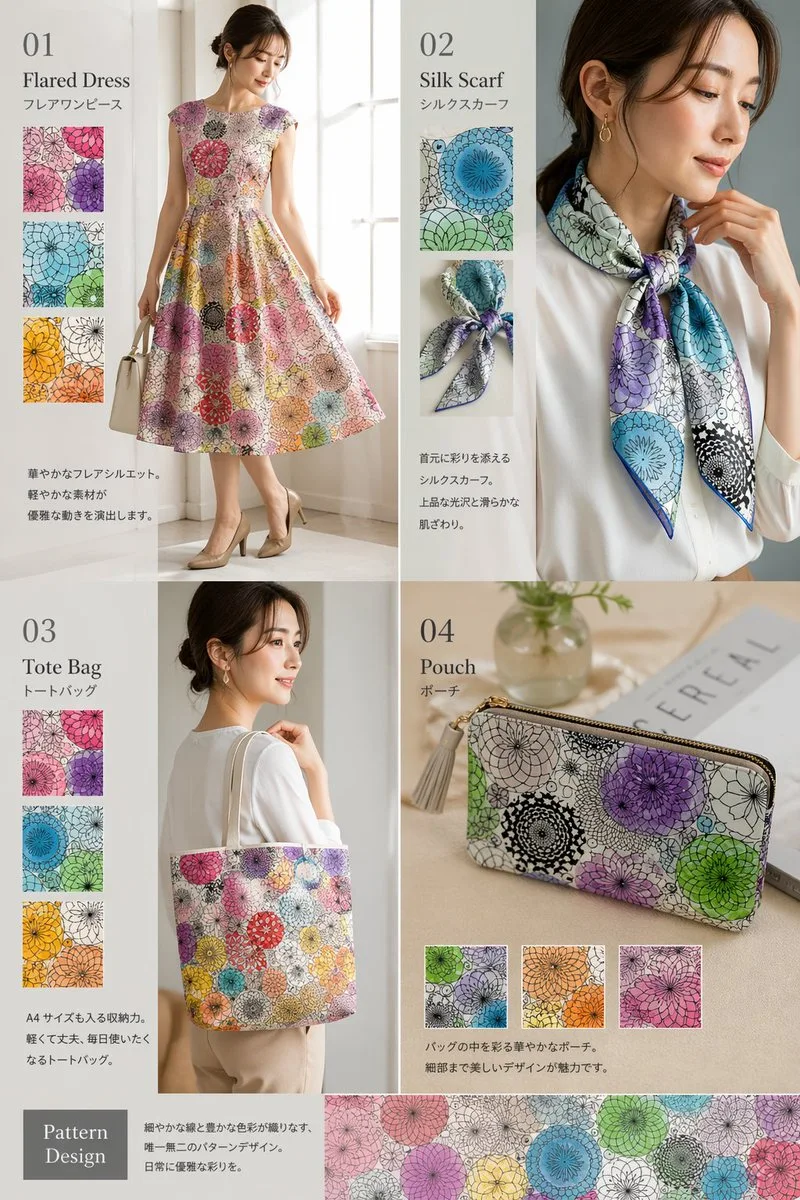
클릭하여 전체 이미지 보기 · 원본 사례 참조용
사례 출처
@aiehon_aya ↗ · 사례 #138
원본 사례 내용을 유지합니다. 생성 결과는 모델 버전, 참조 이미지 및 매개변수에 따라 달라질 수 있으며, 본 사이트에서 개별 검증을 진행하지 않아 동일한 결과의 재현을 보장하지 않습니다.
브랜드 및 로고 / PROMPT #138
커버 레이아웃 디자인 · #138
먼저 이미지를 확인한 뒤 원본 프롬프트를 복사하세요. 치환 문구가 있는 경우 아래에서 원하는 내용으로 변경할 수 있습니다.
01 / 나만의 버전 설정
02 / 전체 프롬프트 · 원문
{
  "type": "fashion product catalog layout",
  "theme": "A cohesive fashion collection featuring a specific pattern: {argument name=\"pattern description\" default=\"overlapping circular floral mandala motifs in purple, green, blue, orange, and pink\"}",
  "layout": {
    "structure": "2x2 grid with a full-width bottom banner",
    "sections": [
      {
        "id": "01",
        "title": "{argument name=\"product 1\" default=\"Flared Dress\"}",
        "subtitle": "フレアワンピース",
        "main_image": "Woman in patterned flared dress holding white handbag.",
        "swatch_count": 3,
        "swatch_descriptions": ["purple variant", "green/blue variant", "orange/yellow variant"],
        "description_text": "華やかなフレアシルエット。軽やかな素材が優雅な動きを演出します。"
      },
      {
        "id": "02",
        "title": "{argument name=\"product 2\" default=\"Silk Scarf\"}",
        "subtitle": "シルクスカーフ",
        "main_image": "Woman in white blouse with patterned silk scarf.",
        "swatch_count": 2,
        "swatch_descriptions": ["flat pattern detail", "tied knot detail"],
        "description_text": "首元に彩りを添えるシルクスカーフ。上品な光沢と滑らかな肌ざわり。"
      },
      {
        "id": "03",
        "title": "{argument name=\"product 3\" default=\"Tote Bag\"}",
        "subtitle": "トートバッグ",
        "main_image": "Woman carrying patterned tote bag.",
        "swatch_count": 3,
        "swatch_descriptions": ["purple variant", "blue variant", "orange/yellow variant"],
        "description_text": "A4サイズも入る収納力。軽くて丈夫、毎日使いたくなるトートバッグ。"
      },
      {
        "id": "04",
        "title": "{argument name=\"product 4\" default=\"Pouch\"}",
        "subtitle": "ポーチ",
        "main_image": "Patterned zip pouch on table with magazine and vase.",
        "swatch_count": 3,
        "swatch_descriptions": ["green/purple variant", "orange variant", "pink variant"],
        "description_text": "バッグの中を彩る華やかなポーチ。細部まで美しいデザインが魅力です。"
      }
    ],
    "bottom_banner": {
      "title": "Pattern Design",
      "description_text": "細やかな線と豊かな色彩が織りなす、唯一無二のパターンデザイン。日常に優雅な彩りを。",
      "image": "Horizontal strip showing the seamless pattern."
    }
  }
}사용하시는 이미지 생성 도구에 붙여넣어 사용하세요. 본 사이트는 프롬프트 탐색 및 편집 기능만 제공하며 직접 이미지를 생성하지 않습니다.
03 / 생성 전 체크리스트
- 치환 문구를 구체적인 내용으로 바꾸고, 참조 이미지가 필요한지 확인하세요.
- 텍스트가 포함된 경우 원하는 문구를 명확히 지정하고, 생성 후 글자를 꼼꼼히 확인하세요.
- 효과를 쉽게 비교할 수 있도록 피사체, 조명, 구도 중 한 번에 하나씩만 수정하세요.
관련 영감 더 둘러보기
더 많은 브랜드 및 로고 사례