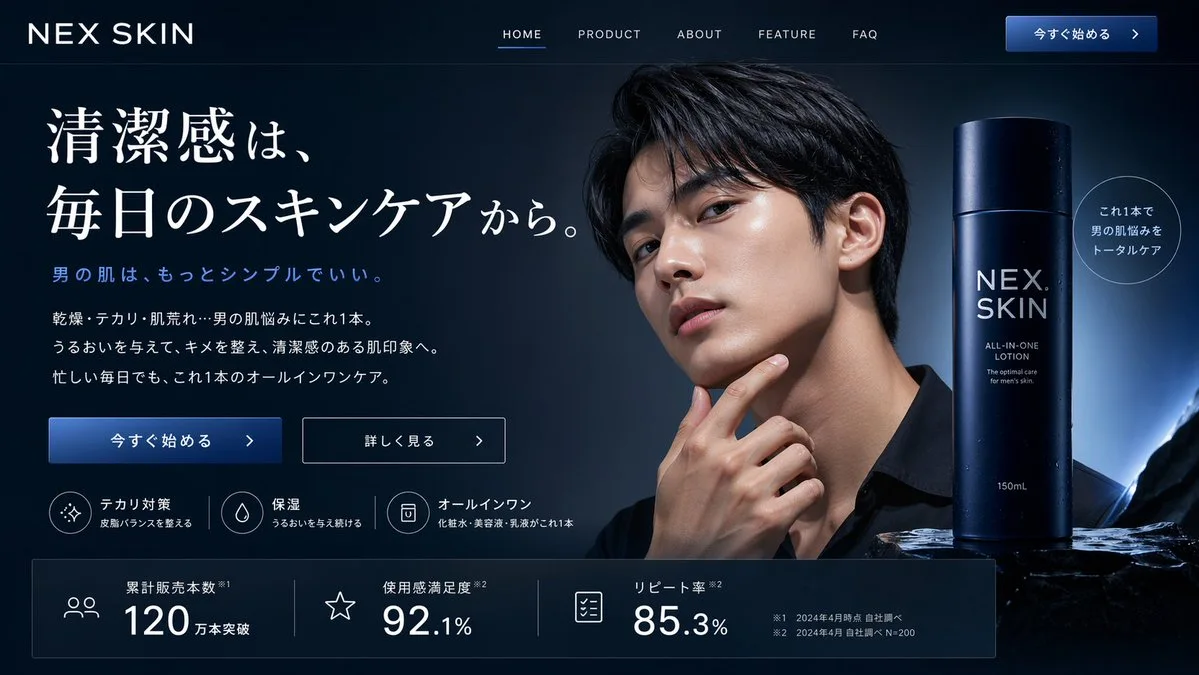
클릭하여 전체 이미지 보기 · 원본 사례 참조용
사례 출처
@ryuya__31 ↗ · 사례 #135
원본 사례 내용을 유지합니다. 생성 결과는 모델 버전, 참조 이미지 및 매개변수에 따라 달라질 수 있으며, 본 사이트에서 개별 검증을 진행하지 않아 동일한 결과의 재현을 보장하지 않습니다.
브랜드 및 로고 / PROMPT #135
앱 인터페이스 목업 · #135
먼저 이미지를 확인한 뒤 원본 프롬프트를 복사하세요. 치환 문구가 있는 경우 아래에서 원하는 내용으로 변경할 수 있습니다.
01 / 나만의 버전 설정
02 / 전체 프롬프트 · 원문
{
  "type": "website landing page mockup",
  "theme": "men's skincare, sleek, professional, dark mode",
  "color_palette": "{argument name=\"color scheme\" default=\"dark navy blue\"}, white text, subtle blue gradients",
  "header": {
    "logo": "{argument name=\"brand name\" default=\"NEX SKIN\"}",
    "navigation": ["HOME", "PRODUCT", "ABOUT", "FEATURE", "FAQ"],
    "cta_button": "今すぐ始める >"
  },
  "hero_section": {
    "left_column": {
      "headline": "{argument name=\"main headline\" default=\"清潔感は、毎日のスキンケアから。\"}",
      "sub_headline": "男の肌は、もっとシンプルでいい。",
      "body_text": "3 lines of descriptive text about skincare benefits",
      "buttons": [
        {"style": "solid blue", "text": "今すぐ始める >"},
        {"style": "outlined", "text": "詳しく見る >"}
      ],
      "feature_highlights": {
        "count": 3,
        "items": [
          {"icon": "sparkle", "title": "テカリ対策", "subtitle": "皮脂バランスを整える"},
          {"icon": "water drop", "title": "保湿", "subtitle": "うるおいを与え続ける"},
          {"icon": "shield/bottle", "title": "オールインワン", "subtitle": "化粧水・美容液・乳液がこれ1本"}
        ]
      }
    },
    "center_image": {
      "subject": "handsome {argument name=\"target demographic\" default=\"young Asian man\"}",
      "appearance": "clean-cut, dark hair, flawless glowing skin, wearing a black shirt",
      "pose": "hand touching chin thoughtfully",
      "lighting": "dramatic studio lighting highlighting facial structure"
    },
    "right_column": {
      "product_shot": {
        "bottle": "tall cylindrical dark blue bottle with water droplets",
        "labels": ["{argument name=\"brand name\" default=\"NEX SKIN\"}", "{argument name=\"product type\" default=\"ALL-IN-ONE LOTION\"}", "150mL"],
        "base": "textured dark rock surface",
        "badge": "circular outlined badge reading 'これ1本で男の肌悩みをトータルケア'"
      }
    }
  },
  "bottom_stats_bar": {
    "count": 3,
    "items": [
      {"icon": "users", "label": "累計販売本数", "value": "120万本突破"},
      {"icon": "star", "label": "使用感満足度", "value": "92.1%"},
      {"icon": "checklist", "label": "リピート率", "value": "85.3%"}
    ],
    "footnotes": "small legal text on the right"
  }
}사용하시는 이미지 생성 도구에 붙여넣어 사용하세요. 본 사이트는 프롬프트 탐색 및 편집 기능만 제공하며 직접 이미지를 생성하지 않습니다.
03 / 생성 전 체크리스트
- 치환 문구를 구체적인 내용으로 바꾸고, 참조 이미지가 필요한지 확인하세요.
- 텍스트가 포함된 경우 원하는 문구를 명확히 지정하고, 생성 후 글자를 꼼꼼히 확인하세요.
- 효과를 쉽게 비교할 수 있도록 피사체, 조명, 구도 중 한 번에 하나씩만 수정하세요.
관련 영감 더 둘러보기
더 많은 브랜드 및 로고 사례