クリックで拡大表示 · 作例の参考イメージ
作例の出典
@saniaspeaks_ ↗ · 作例 #437
オリジナルの作例内容を保持しています。生成結果はモデルのバージョン、参照画像、パラメータによって左右されます。本サイトでは個別の完全な再現を保証するものではありません。
UI・インターフェース / PROMPT #437
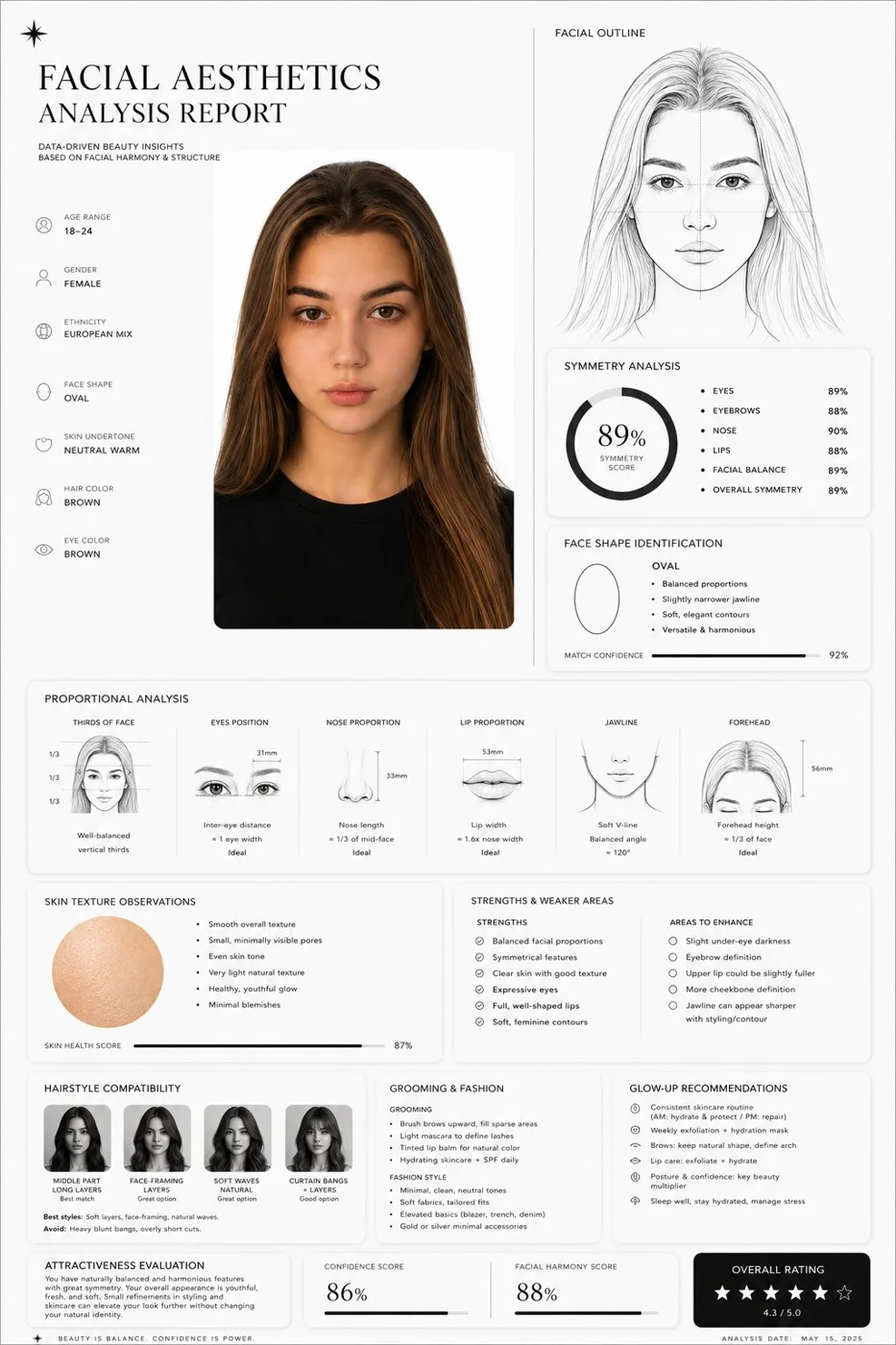
顔立ちの美学分析レポート
画像を確認してからプロンプトをコピーしてください。プレースホルダーがある場合は、下部で内容を書き換えることができます。
01 / カスタマイズ
この作例には自動検出されたプレースホルダーはありません。コピー後、被写体・配色・テキスト・比率などを適宜変更してください。
02 / プロンプト全文 · 原文
Create a clean, minimal, luxury-style facial aesthetics analysis report based on the uploaded portrait photo.
Design style:
Ultra-modern black and white interface, premium editorial aesthetic, thin elegant divider lines, soft rounded cards, subtle shadows, spacious layout, luxury skincare / fashion magazine vibe, monochrome palette, Apple-style UI refinement.
Include:
– A simple contour line-art drawing of the face based on the subject
– Facial symmetry analysis
– Face shape identification
– Proportional analysis (eyes, nose, jawline, lips, forehead)
– Skin texture observations
– Hairstyle compatibility suggestions
– Grooming and fashion recommendations
– Honest attractiveness evaluation with balanced critique
– Strengths and weaker facial areas explained objectively
– Actionable glow-up recommendations
– Confidence score and facial harmony score shown with elegant charts or meters
Style notes:
Keep the report data-driven, visually refined, realistic, and not overly flattering.
Avoid exaggerated praise.
Use clean typography, premium spacing, modern infographics, subtle geometric accents, and professional cosmetic consultation aesthetics.
Visual composition:
Magazine-quality presentation, luxury beauty report dashboard, highly organized layout, cinematic monochrome feel, minimalist infographic design, realistic facial structure interpretation, modern masculine beauty analytics.
Rendering:
Ultra-detailed, sharp UI design, realistic portrait adaptation, sophisticated editorial presentation, high-end branding aesthetic, 4K quality.
お使いの画像生成ツールに貼り付けてご使用ください。本サイトはプロンプトの閲覧・編集ツールであり、画像の直接生成は行いません。
03 / 生成前のチェック
- プレースホルダーを具体的な内容に置き換え、参照画像が必要か確認します。
- 文字を含む場合はテキストを確定し、生成後に一文字ずつ確認します。
- 被写体、光、構図は一度に一箇所ずつ調整すると、効果を比較しやすくなります。
関連するインスピレーション
UI・インターフェースの他の作例