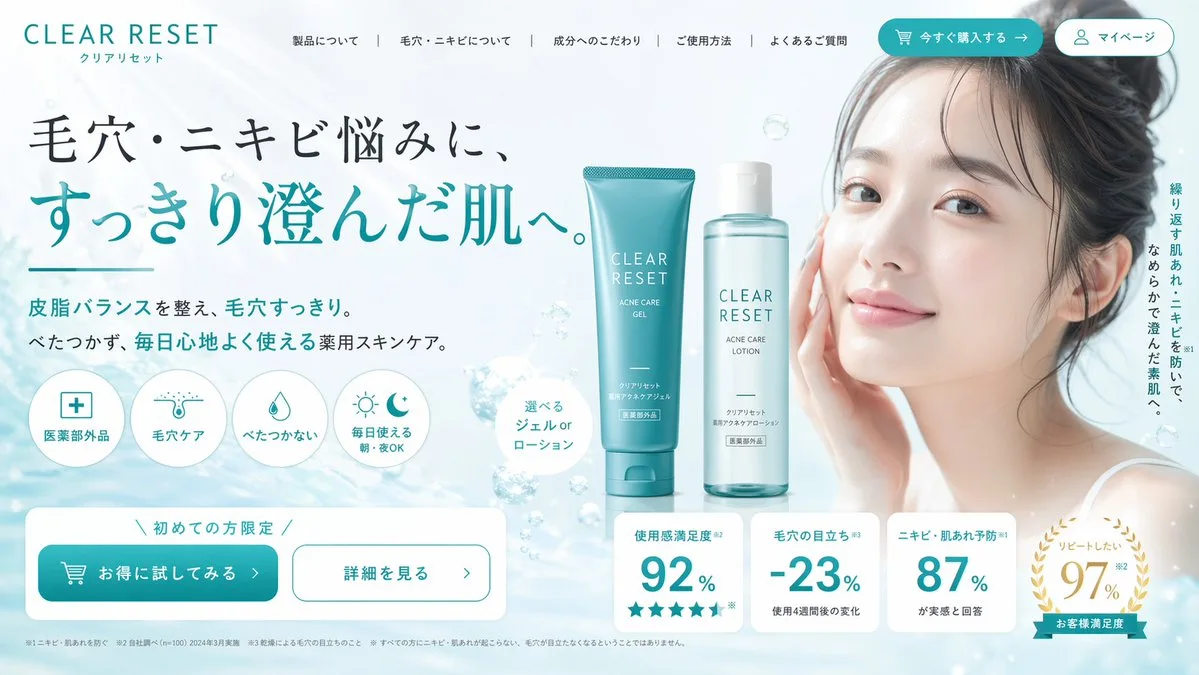
Click to view full image · Reference sample
Source
@ryuya__31 ↗ · Case #136
Original prompt preserved. Results vary depending on model version, reference image, and parameters; identical outputs are not guaranteed.
Brand & Logos / PROMPT #136
Brand Visual Identity · #136
Review the image, then copy the prompt. If placeholders are present, customize them below.
01 / Customize your version
02 / Full Prompt · Original
{
  "type": "e-commerce landing page hero section",
  "brand": "{argument name=\"brand name\" default=\"CLEAR RESET\"}",
  "theme": "refreshing skincare, clean aesthetic, water bubbles background",
  "color_palette": ["white", "{argument name=\"primary color\" default=\"teal\"}", "light blue"],
  "layout": {
    "header": {
      "logo": "CLEAR RESET",
      "navigation_links": {"count": 5, "labels": ["About Product", "About Pores/Acne", "Ingredients", "How to Use", "FAQ"]},
      "action_buttons": {"count": 2, "labels": ["Buy Now", "My Page"]}
    },
    "hero_content": {
      "headline": "{argument name=\"main headline\" default=\"毛穴・ニキビ悩みに、すっきり澄んだ肌へ。\"}",
      "subheadline": "Balances sebum and clears pores. Non-sticky, medicated skincare for comfortable daily use.",
      "vertical_copy": "Prevents recurring rough skin and acne, leading to smooth, clear skin."
    },
    "visuals": {
      "model": "{argument name=\"model description\" default=\"young Asian woman with clear radiant skin, hair tied up, smiling softly\"}",
      "products": {
        "count": 2,
        "description": "{argument name=\"product type\" default=\"acne care gel tube and lotion bottle\"}",
        "placement": "center"
      },
      "background": "light blue gradient with floating water bubbles"
    },
    "feature_highlights": {
      "count": 4,
      "style": "circular icons with text below",
      "labels": ["Quasi-drug", "Pore Care", "Non-sticky", "Daily Use Morning/Night OK"]
    },
    "call_to_action": {
      "banner_text": "Limited to first-time buyers",
      "buttons": {"count": 2, "labels": ["Try it at a discount", "See details"]}
    },
    "statistics_cards": {
      "count": 4,
      "style": "white rectangular cards with large teal numbers",
      "labels": ["Satisfaction 92%", "Pore visibility -23%", "Acne prevention 87%", "Want to repeat 97%"]
    }
  }
}
Copy into your preferred AI image generator. Prompt Atelier provides prompt browsing and editing, but does not generate images directly.
03 / Pre-generation checklist
- Replace placeholders with specific details, and check whether reference images are needed.
- Specify exact wording for text elements, and proofread carefully after generation.
- Adjust only one element at a time—subject, lighting, or composition—to compare results easily.
Explore related inspiration
More in Brand & Logos