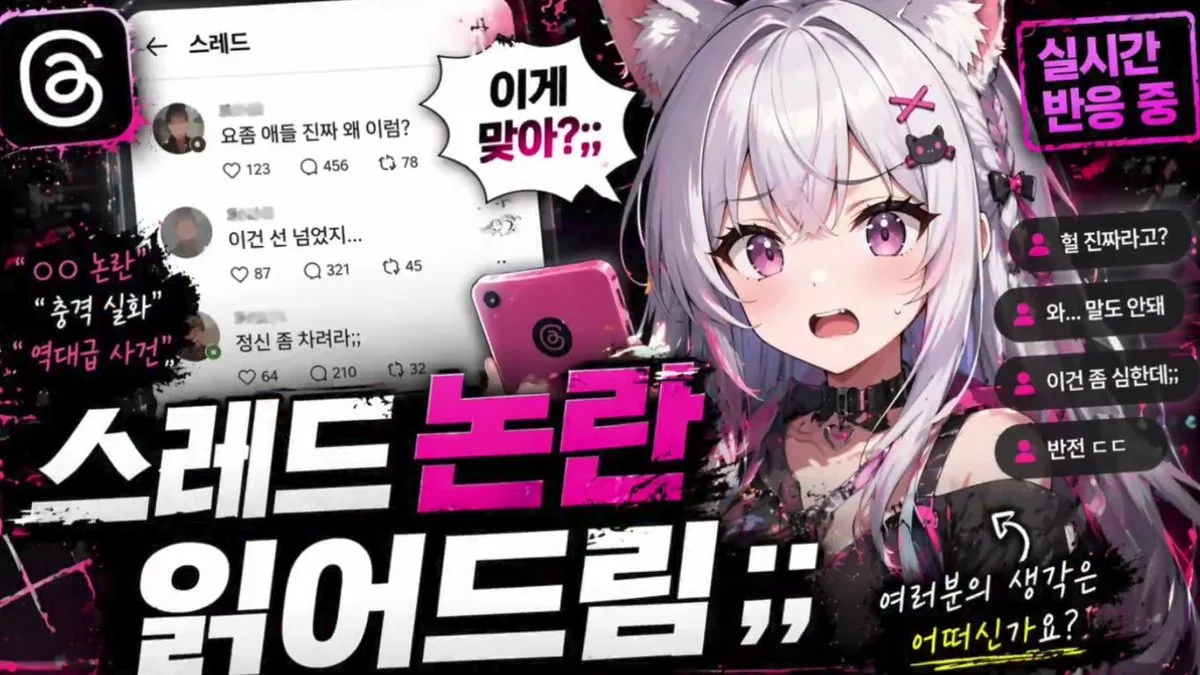
Click to view full image · Reference sample
Source
@abdiisan ↗ · Case #106
Original prompt preserved. Results vary depending on model version, reference image, and parameters; identical outputs are not guaranteed.
Creative Applications / PROMPT #106
App UI Mockup · #106
Review the image, then copy the prompt. If placeholders are present, customize them below.
01 / Customize your version
02 / Full Prompt · Original
{
  "type": "YouTube thumbnail graphic",
  "style": "anime, edgy, neon pink and black color scheme, grunge and splatter accents",
  "character": {
    "appearance": "anime girl, {argument name=\"hair color\" default=\"silver\"} hair, cat ears, purple eyes",
    "expression": "{argument name=\"expression\" default=\"shocked and sweating\"}, mouth open",
    "accessories": "black cat hairclip with pink cross, black choker with heart ring",
    "action": "holding a pink smartphone with a swirl logo"
  },
  "layout": {
    "main_title": {
      "position": "bottom center",
      "style": "huge, bold, 3D typography, grunge texture",
      "lines": [
        { "text": "{argument name=\"main title top\" default=\"스레드 논란\"}", "color": "neon pink" },
        { "text": "{argument name=\"main title bottom\" default=\"읽어드림 ;;\"}", "color": "white" }
      ]
    },
    "ui_elements": [
      {
        "type": "social media feed mockup",
        "position": "mid-left",
        "header": "← 스레드",
        "post_count": 3,
        "details": "avatars, Korean text, interaction icons for like, comment, repost"
      },
      {
        "type": "live chat mockup",
        "position": "right edge",
        "message_count": 4,
        "details": "pink user icons, Korean text"
      }
    ],
    "text_callouts": [
      {
        "type": "spiky speech bubble",
        "position": "center top",
        "text": "{argument name=\"speech bubble text\" default=\"이게 맞아?;;\"}"
      },
      {
        "type": "neon box",
        "position": "top right",
        "text": "실시간 반응 중"
      },
      {
        "type": "floating grunge text",
        "position": "far left",
        "line_count": 3,
        "text": ["OO 논란", "충격 실화", "역대급 사건"]
      },
      {
        "type": "handwritten text with arrow",
        "position": "bottom right",
        "text": "여러분의 생각은 어떠신가요?"
      }
    ],
    "logos": [
      {
        "type": "app icon",
        "position": "top left",
        "description": "white swirl logo on black rounded square"
      }
    ]
  }
}
Copy into your preferred AI image generator. Prompt Atelier provides prompt browsing and editing, but does not generate images directly.
03 / Pre-generation checklist
- Replace placeholders with specific details, and check whether reference images are needed.
- Specify exact wording for text elements, and proofread carefully after generation.
- Adjust only one element at a time—subject, lighting, or composition—to compare results easily.
Explore related inspiration
More in Creative Applications